Mellowdo
Beta Free while we’re in beta

One thing.
A little lighter.

Mellowdo is the calm to-do and focus app for ADHD and busy brains. Get it out of your head, do one thing while the lava fills, tick it off. Then the next.

No ads, no tracking, nothing sold.
Why it feels different

Most to-do apps quietly
become another job.

You spend more time sorting, tagging and feeling behind than actually doing. Mellowdo is built the other way round.

Out of your head

Type one line or just say it. Tasks, thoughts and “oh wait” moments land in the right place without filing.

One thing at a time

Start my day lines up your routines and what’s due. Focus shows only the next thing, with a timer that fills like a lava lamp.

No guilt

No streaks to break and no red overdue walls. Unfinished things roll gently to tomorrow. Progress just shows you turned up.

What’s inside

Five calm screens. That’s the whole app.

Focus

A timer you actually want to look at.

Hit Go and the lava starts to fill. One task on screen, the next one waiting quietly underneath. Pomodoro rounds when you want them, and Auto moves you on when time’s up.

  • Lofi
  • Piano
  • Rain
  • Café
  • Sea
  • Pond
Focus: a lava-lamp timer counting down on Book the garage
Today

Your day, already lined up.

Routines, anything due and the things you picked, in one list. Tap Start my day and Focus walks you through it.

Today: Start my day, a morning routine and tasks due today
Thoughts

Park it. Carry on.

That “oh wait” in the middle of something? Park it in one tap and turn it into a task later.

Thoughts: a box asking what’s on your mind
Routines

Mornings on rails.

Mornings, evenings, the gym. Set the steps once, add a one-off just for today.

Routines: morning, gym and evening steps
Lists

Lists, notes and logs.

Shopping, the house, work. Share one with your partner and you both see what’s done.

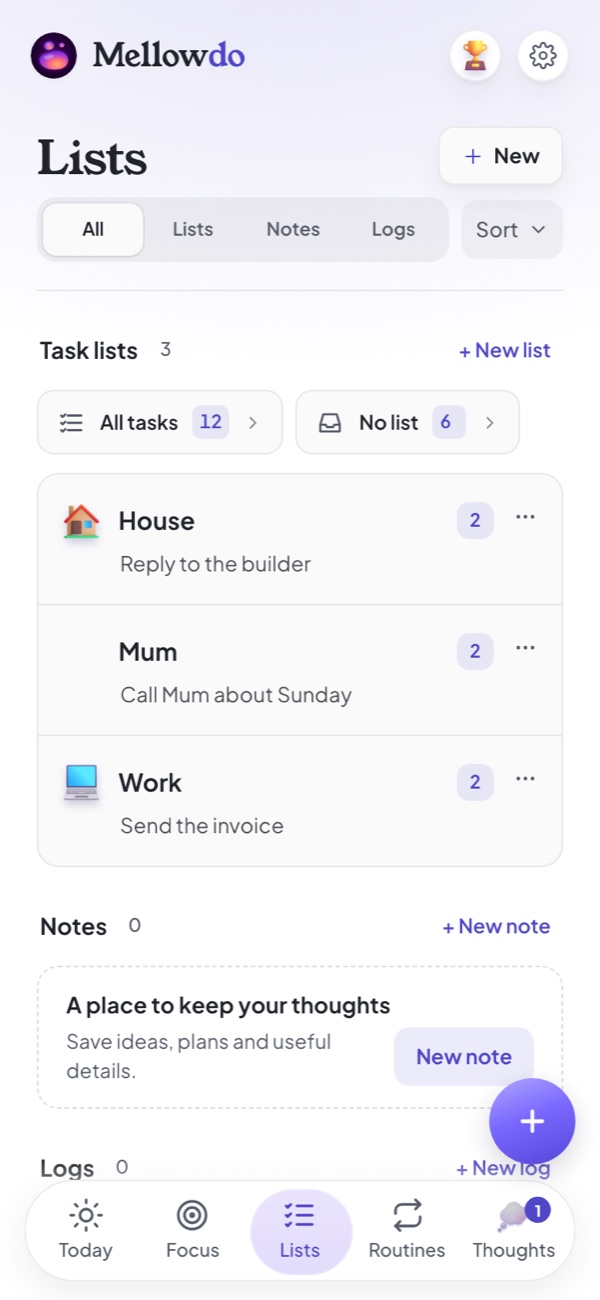
Lists: House, Mum and Work lists
The web app

Big screen. Same calm.

Open mellowdo.app on your computer and it’s all there, with room to breathe. Nothing to install, and it stays in step with your iPhone.

Mellowdo on a computer: today’s routines and tasks, with the day’s timeline alongside Mellowdo’s month calendar with tasks on their days Mellowdo’s full-screen focus timer with the lava filling

Your whole day at a glance

Tasks on the left, a timeline of when you’ll finish on the right.

Day, week and month

A calendar that shows your tasks where they fall.

A timer that floats

Pop the timer out and it sits over your other windows while you work.

In step with your phone

One account. Tick it off at your desk, it’s ticked on your iPhone.

Open the web app
Scenes and sound

Watch the lava fill.
Or pick a painting.

Eight paintings to focus inside, with lofi, rain and café sounds if you want them. Choose the one that suits the hour.

Lava painting
Lava
Space painting
Space
Café painting
Café
Tide painting
Tide
Bloom painting
Bloom
Lofi room painting
Lofi room
Office painting
Office
Yin Yang painting
Yin Yang
Stay in it

Fewer ways to drift off.

iPhone app

Block the apps that pull you away.

Choose the apps that distract you. They’re blocked while a Focus timer runs, and pausing lifts the block, so there’s always a way out.

Web and iPhone

Bring your own soundtrack.

Got a YouTube mix you always work to? Save it once and play it while you focus, next to our own lofi, piano and rain.

Add milk and teabags, call the dentist, and move the bins to Friday.
Mellow
Done. All added, and the bins are on Friday now.
  • Milk and teabagsShopping
  • Call the dentist5 min
  • Bins outFriday
Undo
Meet Mellow

Talk. Mellow does the admin.

Say it or type it however it comes out. Mellow turns a ramble into tasks, plans your day around fixed times, and asks before anything big.

  • Speech is turned into text on your iPhone, nothing recorded
  • Everything Mellow does can be undone
  • Optional: the whole app works without it
  • Already use Claude or ChatGPT? Connect Mellowdo and just say “add this to my Mellowdo”
Share the load

Lists, logs and notes, for two.

Share a shopping list, a feeding log or a note with your partner and you both see what’s done, as it happens.

What you won’t find

Calm on purpose.

Some things are missing because they make you feel worse, not better.

  • Streaks to break
  • Red overdue walls
  • Ads
  • Tracking
  • Your data for sale

Just want the timer?

The Lava Focus Timer is free and needs no sign-up. Set the minutes, press Go, watch it fill.

Open the free timer

“Managing your tasks should never take more effort than doing them.”

The one rule Mellowdo is built on.

Questions

Is it only for ADHD?

It’s built with ADHD brains in mind, but it suits anyone who finds normal to-do apps heavy: busy parents, people with too many tabs open in their head, anyone who freezes at a long list.

How much does it cost?

Free while it’s in beta, with everything included. Later there’ll be a free version that does the whole job, and an optional paid Plus. Anything you’ve already made stays yours either way.

Which devices?

The web app works in any modern browser on a computer, tablet or phone. The iPhone app is in beta now and coming to the App Store. Your account syncs between them.

What happens to my data?

Your tasks are stored in your account (hosted in London) so they sync between devices. No ads, no tracking, nothing sold. You can export everything or delete your account in the app at any time. Privacy policy.

Does it work with Claude or ChatGPT?

Yes. Connect Mellowdo once and you can ask Claude or ChatGPT to add tasks, tell you what’s on today, tick things off or park a thought. It only sees your tasks, lists and thoughts, after you tap Allow. How to connect it.

Do I have to use the AI?

No. Mellow is there if you want to talk or type instead of tapping. Everything else works without it, and it asks before it’s switched on.

Try one thing.
See how it feels.

It takes about a minute to start.

Open Mellowdo Get the iPhone beta